
Just-Snips
It's your haystack after all.
Your very own, private media library.
Complete
with superior search, solid edit
& display capabilities.
Your very own, private media library.
Complete
with superior search, solid edit
& display capabilities.
Fast or deep search, at your fingertips. Either search quickly for text fragments, or more in depth for attributes like size, color, and even people, or location of your asset.
You can see what the asset contains, not just for bitmaps but also for text. Thumbnails show the first lines of text, RTF, and HTML. This also includes SVG and even GIF animations.

So many ways to sort assets, by name, dates, sizes, colors, a location or at random (for those slideshows). It even works across libraries.
Each asset can be tagged with a name, a formatted description,
people, locations, colors, languages, tags,
dates, origin, copyright etc.
This is available for all asset types, not just JPG and PNG.
You can work on multiple assets at once crop, rename, meta tags,
filter, people, locations and so on.
So imagine wanting to take a number of screenshots and
then cropping them all in one go in the exact same dimensions. Easy.

Project your assets into slideshows in the app, the Windows desktop background, or the Windows Lockscreen.
Use multiple assets per page! Even use
live content.

This Is Scrapbooking. Take any asset and turn them into pages of a snip. You can combine as many assets as you like with text and other shapes, then export your work to bitmaps.
Organize your work in a folder tree that lets you structure what you own.
Just-Snips does not use online resources for processing and storage. None of your assets are ever
uploaded to a cloud provider for storage or an AI for training.
No scanning of you family faces, no scraping of coordinates and dates. None of that. All
yours.
(Unless you upload them yourself, which you can do, of course. Just-Snips can use local
Dropbox etc folders.).
The only data reported is for App
Telemetry (in the Microsoft Windows App Store).
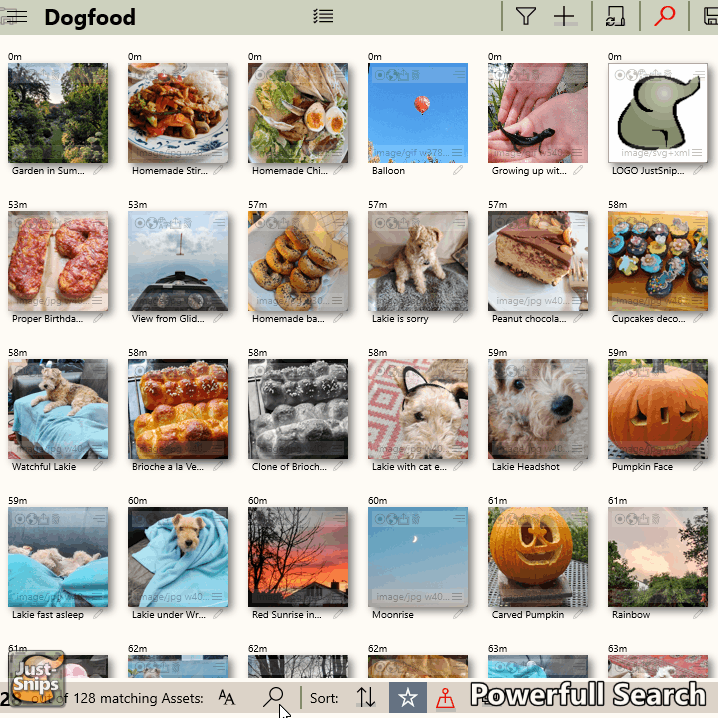
Many, many ways to find the assets you are looking for.
Thumbnails show the contents of each asset, even text or animations. They also give quick info about the asset through status icons.
You can draw a frame around the faces of people on a bitmap. If their names are mentioned in a text asset, they are recognized, too.
You can define and perform a crop for multiple assets at once.
Can turn any PowerSearch into a Slideshow
You can use assets from a library to create a new Snip and add a page for each of them.
Folders contain Libraries, Snips, PowerSearches and Sub-Folders